Tutorial · Big Two
Play Big Two online with friends, no TV needed
Play Big Two with friends who aren't in the same room, each on their own phone. Send one link, and bots fill any empty seat. Free, no accounts, no app.
- 2 minutes to set up
KARDX is a free card table for your TV: everyone plays on their own phone.
KARDX is built for a room: the TV shows the table, and everyone holds their cards on their phone. But when your friends are across town or on a train, or there's no TV handy, you can still play Big Two together. Each phone shows the whole table, not just your hand.
This page gets four of you to one table, and covers what happens when someone drops out.
What you need
- A phone each. Any phone with a browser. There's no app to install and no account to make.
- Internet. Each phone only needs to reach kardx.net. Nobody has to be on the same Wi-Fi, so mobile data is fine.
- A way to send a link. A group chat works well.
- A way to talk, if you want one. KARDX has reactions but no chat or voice, so keep a call or the group chat open to groan at each other's 2s.
You don't need four people: bots fill the empty seats.
1. Open a table on your phone
Go to Big Two and press Create table. On a phone, you go straight to the new table's join page. Type a name, or tap the sparkles button for one, and press Sit down.
You can skip the join page's box about putting the table on a TV or laptop: nobody needs a shared screen for this.
2. Send everyone the link
Open the settings (the ⚙ at the top). Under This table are the table's code and an Invite someone button. Press it.
- In the same room? Hold out your phone and each friend scans the panel's QR code with their camera.
- Share opens your phone's share sheet, so you can send the link straight to your group chat.
- Copy copies the link, for anywhere else.
- Or read out the table's code. It's made of words, so it's easy to say on a call. Your friends go to kardx.net, type it under Join a table and press Join as player.
The link opens the table's join page. Each friend picks a name and presses Sit down.
3. Start the match
Anyone seated can press the start button. With four people it says Start the match; with fewer, it says how many bots it will seat (Start with 1 bot, say) and seats them as it deals.
A friend who joins later takes over a bot's seat at once, even mid-deal, and plays on with its cards and points. Their join page tells them so before they sit down.
4. What your phone shows
With no TV, your phone is the table. It shows everything the TV would, around your hand:
- Along the top, a tag for each of the others: their name, how many cards they hold and their points. The player whose turn it is stands out. A tag says Passed when they pass, and LAST CARD when they're down to one. A bot has a robot head before its name.
- In the middle, the play to beat, who played it, and what it is ("Straight to the king"). When it's your lead, it says so ("You lead, with anything").
- At the bottom, your hand, a line naming what your picked cards make, and Pass and Play. When it's your move, Your turn and your clock show above your hand.
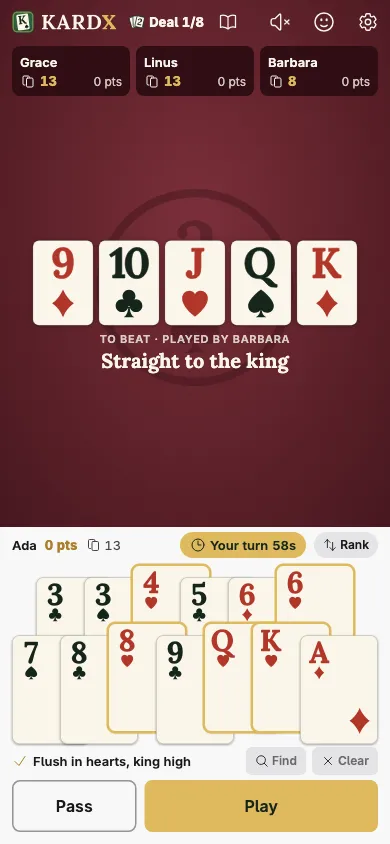
At the top, the book opens the rules this table plays by, and the ⚙ opens its settings, which are shared by every phone.
5. When someone drops out
Phones lock, trains go into tunnels. KARDX keeps the game going:
- Their tag shows a disconnected badge, and their turn clock keeps running. If it runs out, they pass, or, on their lead, a single card is played for them.
- After two of their turns in a row run out, a bot plays their cards under their name until they're back; meanwhile their tag shows the robot head.
- To get back in, they reopen the page on the same phone, whose browser remembers the seat. If they've closed it, the table's join page or the Big Two page offers the seat back.
- If someone has to leave for good, they press Leave table in the settings. Mid-deal, a bot takes their seat and plays their cards to the end of the deal. The seat keeps its points for whoever sits there next.
If everyone is away at once, the next deal waits for someone to come back.
Changing phones. Open my seat on another device, in the settings, gives a link that moves your seat to another phone. It works for 10 minutes.
6. Between deals
At the end of a deal, every phone shows who went out and everyone's points. The next deal starts on its own after a countdown, or anyone can press Deal now. A match is eight deals unless you chose another length, and the lowest total wins.
A game over a call tends to be slower than one in a room. If your group likes to talk between plays, give everyone more time with Time for each turn in the settings.
Try it
Play one deal over a call and notice how often you glance at the others' card counts. The next time you're together, put the same game on the TV: everyone sees each play land at the same moment, and the groan goes around the room instead of down the line. Open a Big Two table on the TV.
Play Big Two
Open a table on the TV and everyone joins from their phone. Free, no accounts, nothing to buy.
Keep reading
- Rules Big Two rules Big Two (Choh Dai Di) rules as KARDX plays them: card order, what you can play, scoring, the house rules a new table plays, and the eight it can change.
- Guide How to play Big Two Big Two (Choh Dai Di) explained: the card order, what you can play, how scoring works, and habits that keep you from ending a deal with a handful of cards.
- Tutorial Practice against bots Play Big Two (Choh Dai Di) against bots on your phone, free, with no account. Pick how good they are and practice leading low, saving 2s and keeping pairs.