Tutorial · Texas Hold'em
Play poker against bots: free, no sign-up
Play Texas Hold'em against bots for free, with no account and nothing to install. Choose how good the bots are and turn on the odds to learn as you play.
- 2 minutes to set up
KARDX is a free card table for your TV: everyone plays on their own phone.
The fastest way to learn poker is to play a lot of hands with nothing riding on them. On KARDX you can do that alone: open a table, fill it with bots, and play as many hands as you like. There's no account to make and nothing to install, and the chips are play money.
This page sets that up, then shows how to get more out of it than just pressing buttons.
What you need
One screen is enough: a laptop, or just your phone. Two is nicer, because it's how a real KARDX table works: a laptop or TV shows the table and your phone holds your cards.
If you've never played, read Texas Hold'em for beginners first. It takes 10 minutes, and the rest of this page will make more sense.
1. Open a table
Go to Texas Hold'em and press Create table.
- On a laptop or TV, the screen becomes the table and shows a QR code and the table's code.
- On a phone, you go straight to the table's join page, ready to sit down. It also says how to put the table on a bigger screen, if you have one.
2. Take a seat
With a phone and a bigger screen: create the table on the bigger screen, scan its QR code with your phone, pick a name and press Sit down.
With just your phone: create the table on the phone, pick a name and press Sit down. Your seat shows the board, the pot and the other players as well as your cards, so you don't need the table open anywhere else.
With just a laptop: open the table screen's own settings (its ⚙ at the top right) and choose Join on this device. Pick a name and press Sit down.
3. Bring in the bots
While you're the only one at a new table, there's a Play with bots button, on the table's screen and on your phone. Press it. It seats a group of bots at a mix of levels and deals the first hand.
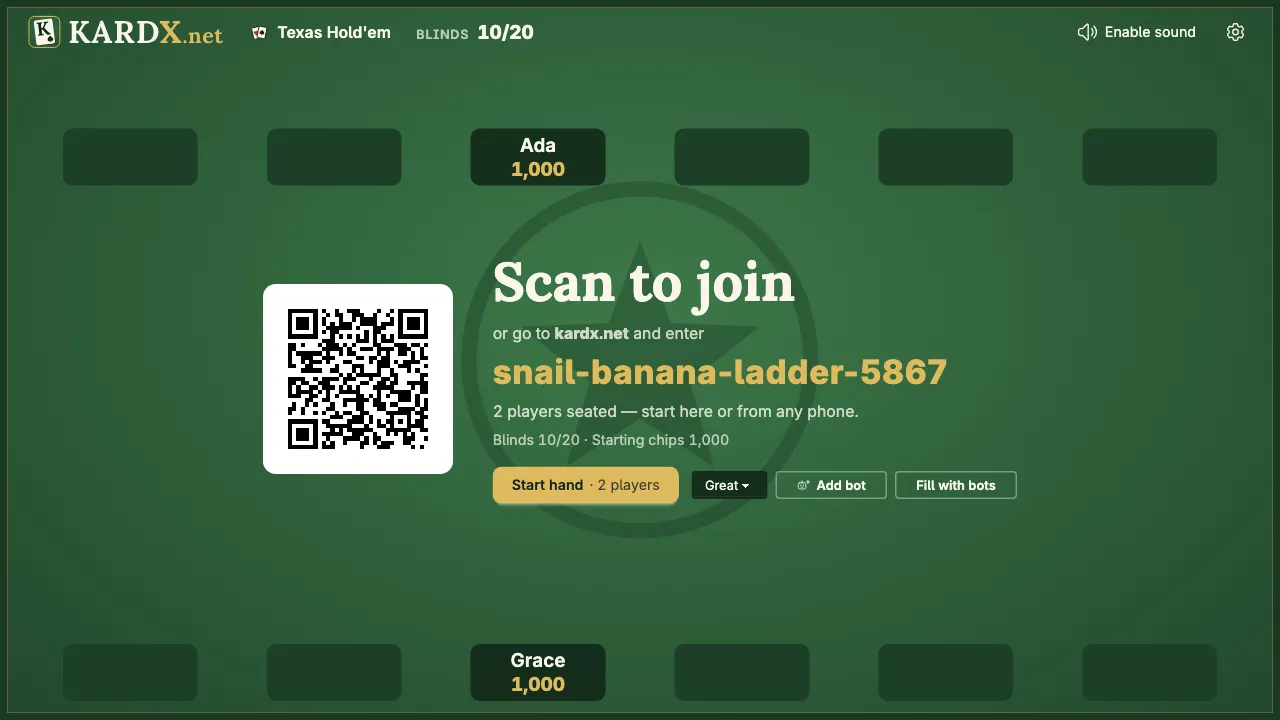
To choose your opponents yourself, use the other two buttons, on the table's screen or in your phone's settings:
- Add bot seats one bot at the level in the picker beside it: Good (the easiest), Great or Pro.
- Fill with bots seats a group at once, at a mix of levels.
Bots sit down between hands, not during one. A table always needs at least one person at it: bots can't be added to an empty table.
4. Turn on the odds
Under your cards there's a row that says Show odds. Tap it. It works whenever there's a bot at the table, and only you see it: it's on your phone, never on the table's screen.
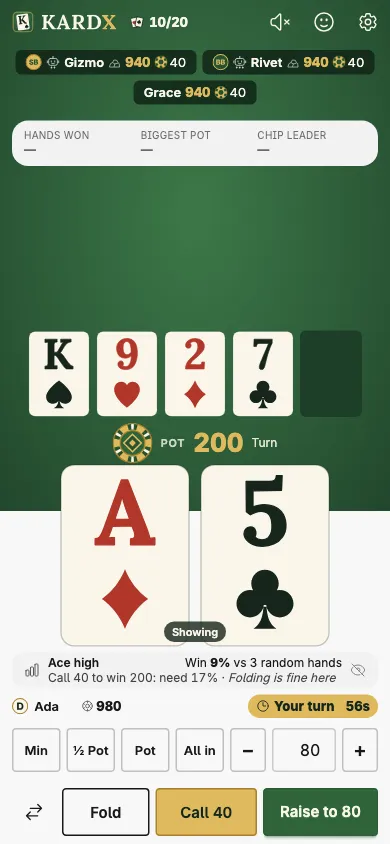
It shows your hand in words ("Ace high"), your chance to win against the players still in, each holding random cards ("Win 9% vs 3 random hands"), the price of a call ("Call 40 to win 200: need 17%"), and a hint: what the Great bot would do in your seat ("Folding is fine here").
The two percentages are the lesson. When your chance to win is higher than the share you need, calling pays over time. When it's lower, fold. In the picture, 9% is less than 17%, so the hint says fold. Poker odds for beginners explains each part of the row, and how to work out both numbers yourself.
Tap the row again to hide it.
5. Know who you're playing
Each bot has a level and a style. Both show at its seat: a robot icon before its name for the level, and a small icon after its name for the style.
The levels, weakest first:
| Level | How it plays |
|---|---|
| Good | By the strength of its own hand, a little looser from a late seat. Cautious, and it rarely bluffs. |
| Great | Before the flop it plays a chart of starting hands, by its seat and what it faces. After the flop it weighs its chance of winning against the price of the bet, the way the odds row does. |
| Pro | Like Great, and it also reads how you've been betting, bets its draws, bluffs now and then, and varies its play so it's harder to read. |
Every level goes all in or folds before the flop once its stack gets short.
The styles are given out at random when a bot sits down:
| Style | Icon | What to expect |
|---|---|---|
| Rock | A rock | Plays few hands and folds easily. When it bets, believe it. |
| Calling Station | A phone | Plays many hands and calls a lot, but seldom raises. Don't bluff it; bet your good hands. |
| Maniac | A flame | Plays many hands, raises often and bluffs a lot. Wait for a strong hand and let it bet into you. |
| Shark | A shark | Balanced. No easy pattern to lean on. |
The advice in the last column is standard poker advice for each kind of player, not something measured against these bots. Four kinds of poker player takes each one in turn, with example hands.
Bots see only what a player in their seat would see: their own two cards and the table. They never see your cards or the deck.
Ways to practice
Playing hand after hand teaches the buttons. These teach the game.
- Play 20 hands tight, which means folding most of them. Fold everything except the hands in the first two groups of the starting hands guide. It feels like doing nothing. Notice how your chips hold up.
- Work out the price yourself. Before the row tells you, do the math: what it costs to call, divided by the pot with your call in it. Calling 50 into a pot that would be 200 is one in four, or 25%.
- Pick one bot and watch it. Find a Calling Station or a Maniac by its icon and watch only that seat for 10 hands. Seeing a style in action is the quickest way to learn to spot it in people.
- Try the bet sizes. When it's your turn to act, the quick sizes (Min, ½ Pot, Pot, All in) set a raise in one tap. See how the bots respond to a small bet and a big one with the same hand. Poker betting rules says what the smallest raise is and what each size means.
Starting over, and other housekeeping
You run out of chips. You're out until the table starts a new game. Open the settings on your phone (its ⚙) and press New game: everyone, bots included, goes back to the starting chips.
You want different opponents. In your phone's settings, Manage players lists everyone at the table with a Remove button. Remove the bots you don't want and add others between hands.
You want different stakes. The blinds and the starting chips can only be set before a table's first hand, or after New game. Poker blinds explained covers what to choose.
You're done. Close the page. The table goes away from the server on its own once it's been idle for a while.
What bots won't teach you
Bots are good for the mechanics: which hands to play, what a bet costs, when to fold. They don't sigh, hesitate, talk or tilt (play worse because they're upset after losing a big hand), and people do all four. When you're comfortable with the mechanics, host a poker night and play some humans.
Try it
Guess before you look. Leave the odds hidden for 10 hands, and each time you have a decision, say what you'd do before you tap Show odds and compare. You'll be surprised how often a hand you liked is a fold.
Texas Hold'em on KARDX
Open a table on the TV and everyone joins from their phone. Free, no accounts, and the chips are play money.
Keep reading
- Rules Texas Hold'em rules Texas Hold'em rules at a glance: how a hand goes from the blinds to the showdown, and the ten poker hands in order, best first, with pictures.
- Tutorial Host a poker night Run a Texas Hold'em night with no chips to count and no cards to shuffle. The TV is the table and each player's phone holds their cards. Free, no accounts.
- Tutorial Hold'em for beginners Learn Texas Hold'em in ten minutes: the blinds, the four betting rounds, what you can do on your turn and who wins at the showdown, with a hand played out.